




.jpg)


Essential Guide to Office Cubicle Installation in 2026

Transform your office productivity with the right cubicle setup. As workspaces evolve rapidly in 2026, efficient office cubicle installation is more crucial than ever for fostering collaboration, focus, and growth.
This article provides a comprehensive, step-by-step guide to office cubicle installation designed specifically for modern offices. You will discover the latest cubicle types and trends, essential planning tips, detailed installation steps, common mistakes to avoid, technology integration, and when to seek professional help.
Learn how to create an efficient, ergonomic, and scalable workspace. Follow this essential guide to ensure your 2026 office installation is a success.
Understanding Office Cubicle Types and Trends in 2026
The landscape of office cubicle installation is rapidly evolving as organizations adapt to new work models and design innovations. In 2026, businesses are prioritizing flexibility, employee wellbeing, and technology integration when planning their workspaces. Understanding the latest cubicle types and trends is essential for making informed decisions that align with productivity and satisfaction goals.
Modular vs. Traditional Cubicles
Modular cubicles are designed for adaptability and can be easily reconfigured to fit changing office needs. These systems use standardized panels and components, allowing for quick adjustments as teams grow or shift. In contrast, traditional cubicles feature fixed layouts that provide durability and a strong sense of privacy.
Feature | Modular Cubicles | Traditional Cubicles |
Flexibility | High | Low |
Customization | Easy | Limited |
Sustainability | Reusable components | Less eco-friendly |
Privacy | Moderate | High |
Businesses with frequent team changes or hybrid work schedules benefit most from modular systems. Industry data shows modular cubicle sales are projected to grow by 15% year over year due to growing demand for office cubicle installation that supports reconfiguration and sustainability. For example, tech startups that regularly onboard new staff often adopt modular solutions to keep pace with expansion.
Traditional cubicles remain popular in sectors where privacy and noise reduction are critical, such as legal or accounting firms. However, the trend in 2026 clearly favors modularity, supporting both sustainability and agile office cubicle installation. Explore more about these trends in Modern Cubicle Office Design Trends.
High-Walled, Low-Walled, and Frameless Designs
Cubicle wall height and design play a major role in shaping the office environment. High-walled cubicles maximize privacy and sound dampening, making them ideal for tasks that require concentration. These are often found in call centers or research departments.
Low-walled cubicles encourage collaboration and visibility, supporting creative, sales, or marketing teams. Employees can easily interact without leaving their seats, which fosters teamwork and a vibrant office culture.
Frameless and glass-panel cubicles are gaining momentum in 2026, prized for their sleek aesthetics and ability to let in natural light. They create an open, modern atmosphere while preserving a sense of individual space. Tech companies, in particular, are adopting glass-panel designs to promote transparency and connection.
As office cubicle installation trends shift, frameless options are increasingly popular for organizations seeking a contemporary, light-filled workspace. Selecting the right wall height and design is crucial to balancing focus and interaction for every team.
Open, Semi-Private, and Hybrid Layouts
The choice of cubicle layout can significantly influence how employees work and collaborate. Open layouts feature minimal barriers, making communication and teamwork effortless. However, they can increase noise and distractions, which may not suit every department.
Semi-private cubicle arrangements offer a middle ground by providing some division without complete isolation. This layout is ideal for teams that need both collaboration and moments of quiet focus.
Hybrid layouts combine open areas, semi-private zones, and enclosed cubicles within the same office. Industry surveys reveal that 60% of new offices in 2026 use hybrid cubicle layouts in their office cubicle installation strategy. This approach supports flexible work models and allows businesses to adapt spaces for both teamwork and individual productivity.
Choosing the right layout impacts employee satisfaction and overall productivity. As organizations continue to embrace hybrid and flexible work, the demand for adaptive office cubicle installation is set to increase, making layout planning a top priority.
Pre-Installation Planning: Setting the Foundation for Success
Careful pre-installation planning is the cornerstone of any successful office cubicle installation. By addressing layout, technical requirements, future needs, and employee wellbeing early, you set the stage for a workspace that is efficient, compliant, and adaptable. Thoughtful preparation helps prevent costly mistakes and ensures your investment delivers long-term value.
Accurate Office Space Measurement and Layout
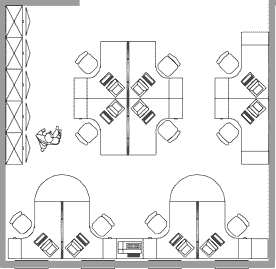
Start your office cubicle installation with precise measurements of the entire workspace. Use a combination of manual tape measures and digital tools, such as CAD software or space planning apps, to account for all room dimensions, doorways, windows, and immovable features.
Measure wall-to-wall distances, noting alcoves and protrusions.
Mark locations for doors, windows, and built-in storage units.
Identify HVAC vents, electrical panels, and emergency exits.
Leave adequate clearance for walkways and ensure all exits remain accessible. Overcrowding can not only violate building codes but also create a cramped environment, reducing productivity and safety. For an overview of customizable workstation options that can fit various layouts, review the Office Cubicles and Workstations resource. Taking these steps early ensures your office cubicle installation meets both functional and regulatory requirements.
Power, Data, and Cable Management Considerations
A robust infrastructure plan is critical for any office cubicle installation. Assess the current electrical capacity to confirm it can support all workstations and future equipment. Map out the placement of outlets, power strips, and network ports for each cubicle.
Consider these cable management solutions:
Raceways for routing wires along floors or walls
Under-desk trays to keep cords organized and out of sight
Wireless charging pads for device convenience
Proper planning reduces IT issues, since 70% of new office problems stem from poor cable management. During installation, secure all cables to prevent tripping hazards and maintain a tidy appearance.
Planning for Scalability and Future Growth
Design your office cubicle installation with adaptability in mind. Predict future hiring needs or possible downsizing by choosing modular cubicle systems that allow for quick reconfiguration.
Allocate extra space for potential new hires.
Select modular panels and components that can be easily added or removed.
Plan for flexible zones that accommodate both individual and team work.
For example, startups anticipating 20% annual growth often opt for expandable systems, ensuring the office can evolve without major disruption. This forward-thinking approach minimizes costly changes down the line.
Ergonomics and Employee Wellbeing
Prioritize ergonomics to enhance employee comfort and reduce long-term health complaints. Modern office cubicle installation should integrate adjustable desks, ergonomic chairs, and monitor arms to support diverse working styles.
Position workstations to maximize access to natural light.
Use acoustic panels and proper airflow to maintain a healthy atmosphere.
Select accessories that encourage good posture and movement.
Industry studies show ergonomic workstations can reduce musculoskeletal complaints by 30%. Investing in employee wellbeing from the planning stage leads to greater satisfaction and productivity for your organization.
Step-by-Step Office Cubicle Installation Process
A successful office cubicle installation is the foundation of a productive workspace. Following a clear, step-by-step process ensures efficient use of space, employee comfort, and seamless integration of technology. Let us walk through each phase to help you deliver a modern, functional office environment.
Step 1: Preparing the Workspace
Begin your office cubicle installation by preparing the workspace. Remove all existing furniture, supplies, and debris from the area. This provides a clean slate and reduces the risk of installation delays.
Check the floor for levelness. Uneven surfaces can cause alignment problems with cubicle panels and desks. Clean all surfaces thoroughly, paying special attention to corners and edges where dust accumulates.
Mark the cubicle locations on the floor using the finalized layout plan. Use masking tape or chalk lines to indicate panel positions, ensuring accuracy. Double-check access to HVAC vents, lighting, and windows to prevent future obstructions.
Remove old furniture and debris
Check and clean floors
Mark cubicle positions
Confirm access to essential building features
A well-prepared space accelerates the office cubicle installation and helps prevent costly mistakes.
Step 2: Assembling Panels and Frames
Unpack all panels, connectors, and hardware before starting assembly. Organize components by size and type to streamline the process. Begin at a reference point, such as a corner or along a wall, to maintain alignment.
Follow the manufacturer's instructions closely for connecting panels. Secure all connections tightly to ensure stability. Use a level to verify that each panel is perfectly vertical, making adjustments as needed.
Modular systems make it easier to adjust configurations if plans change. If you encounter issues, review the instructions or seek assistance to avoid delays.
Assembly Checklist | Importance |
Organize hardware | Prevents missing parts |
Start from reference point | Ensures correct layout |
Check panel levels | Maintains stability |
Taking the time to assemble panels and frames with precision is key to a successful office cubicle installation.
Step 3: Installing Work Surfaces, Storage, and Accessories
Next, attach desktops securely to the assembled frames. Use the correct brackets and fasteners for each workstation. Install under-desk drawers and shelves, ensuring they are level and accessible.
Add overhead bins, keyboard trays, and monitor arms based on user preferences and ergonomic needs. Proper placement of these elements supports comfort and productivity.
Attach desktops and shelves
Install storage units and accessories
Adjust ergonomic components
Check that all components are firmly secured. If you need guidance on ergonomic setups, consult resources or specialists to maximize employee wellbeing during office cubicle installation.
Step 4: Power and Data Integration
Integrating power and data is a critical step in office cubicle installation. Install power modules, outlets, and surge protectors according to the floor plan. Ensure each cubicle has sufficient access to electrical and data connections.
Run Ethernet and data cables through designated channels or raceways. Use cable management solutions like under-desk trays to keep cords organized and accessible. Secure all cables to minimize tripping hazards and maintain a clean appearance.
Test all power and data connections before moving to the next step. Address any issues immediately to avoid disruptions later.
Install power modules and outlets
Run and secure data cables
Test all connections
Effective power and data integration streamlines office cubicle installation and reduces IT issues in the future.
Step 5: Final Adjustments and Quality Checks
Once all components are in place, perform a thorough quality check. Ensure cubicles are aligned, stable, and uniform. Inspect moving parts, such as drawers and cabinet doors, for smooth operation.
Verify that each workstation has functional power and data connections. Clean up any installation debris, packaging, or tools from the workspace.
Check alignment and stability
Test all moving parts
Clean the installation area
A detailed quality check finalizes the office cubicle installation, ensuring readiness for occupancy and long-term satisfaction.
Step 6: Employee Move-In and Orientation
The final phase of office cubicle installation involves welcoming employees to their new workstations. Guide team members on adjusting their desks, chairs, and monitors for ergonomic comfort.
Provide documentation on cable management, cleaning procedures, and cubicle care. Consider holding a brief orientation session to familiarize staff with new features and address questions.
Demonstrate workstation adjustments
Share care and maintenance tips
Offer orientation sessions
Orientation helps employees settle in quickly and reduces post-installation support requests, maximizing the benefits of your office cubicle installation.
Common Mistakes to Avoid During Office Cubicle Installation
When it comes to office cubicle installation, even small mistakes can lead to major setbacks for your business. Avoiding common pitfalls is essential for creating a productive, safe, and flexible workspace that supports your team’s success.
Measurement Errors and Layout Oversights
One of the most frequent mistakes during office cubicle installation is skipping detailed measurements. Failing to account for doors, windows, and structural features can result in cubicles that do not fit properly. This often leads to wasted time, frustration, and costly rework.
It is vital to measure the space precisely, double-check dimensions, and use planning tools or software. Overcrowded layouts may also violate building codes and hinder movement, impacting both safety and productivity.
Poor Cable and Power Management
Improper cable management is a leading cause of IT problems and safety hazards during office cubicle installation. Loose cables can create tripping risks and interfere with daily operations.
Always plan for sufficient power outlets, organize cables using trays or raceways, and label data lines clearly. According to industry studies, over 70% of IT issues in new offices are related to inadequate cable and power planning.
Lighting, Ventilation, and Ergonomics
Neglecting lighting and ventilation needs is another common error. Poor lighting can cause eye strain, while insufficient airflow leads to discomfort and reduced focus.
Equally important is overlooking ergonomic workstation setup. Failing to integrate height-adjustable desks, supportive chairs, or monitor arms can result in long-term health complaints. For guidance on optimal setups, review Ergonomic Desk Solutions to ensure your office cubicle installation supports employee wellbeing.
Planning for Growth and Future Changes
Forgetting to plan for business growth or downsizing can make office cubicle installation much more expensive over time. Rigid layouts are difficult to modify, so always consider modular systems that allow for easy expansion or reconfiguration.
A lack of foresight often forces companies to invest in costly renovations or disrupt operations when staffing needs change.
Real-World Example: The Cost of Oversights
Consider a company that ignored power planning during their office cubicle installation. Soon after move-in, they discovered insufficient outlets and had to halt operations for a full rewiring. This not only delayed productivity but also increased costs significantly.
Taking the time to avoid these mistakes ensures a smooth installation process, a compliant workspace, and lasting value for your investment.
Integrating Technology and Smart Features in 2026 Cubicle Installations
The modern office cubicle installation is no longer just about walls and desks. In 2026, technology integration stands at the heart of workspace innovation. Smart features are rapidly transforming traditional workstations into dynamic, connected environments. According to Office Design Trends 2026, companies are prioritizing sustainability and digital connectivity to enhance productivity and well-being. As you plan your next office cubicle installation, understanding which tech trends add real value is essential.
IoT Devices and Automation
IoT devices have become foundational in any forward-thinking office cubicle installation. Smart lighting adapts to natural daylight, reducing energy use and supporting employee focus. Occupancy sensors automatically adjust lighting and temperature, optimizing comfort while lowering costs. Climate controls embedded within cubicle panels allow personalized temperature settings, creating tailored micro-environments for each user.
Offices that leverage these solutions report up to 25% more efficient space utilization. By gathering real-time data on occupancy and environmental preferences, businesses can continually refine their office cubicle installation for optimal performance and satisfaction.
Power, Connectivity, and Acoustic Solutions
Seamless connectivity is a must for every office cubicle installation in 2026. Wireless charging pads and integrated USB or power outlets are now standard features, keeping devices powered without clutter. Ethernet ports and cable management trays ensure that every workstation remains organized and future-ready.
To combat noise distractions, acoustic solutions like sound-masking systems and noise-canceling panels are increasingly integrated into cubicle designs. These technologies support focused work, especially in hybrid or open-plan offices where privacy matters.
Digital Management and Employee Experience
Digital displays are revolutionizing desk and meeting room management within office cubicle installation projects. Employees can reserve workstations or book meeting rooms with a tap, minimizing scheduling conflicts. These systems also track occupancy data, helping facility managers optimize layouts as teams grow or shift.
Smart cubicle features are not just about convenience, but about supporting the evolving needs of hybrid workforces. By prioritizing both technology and employee experience, companies create environments where teams thrive and adapt quickly to change.
The Future of Smart Cubicles
Looking ahead, the integration of technology into office cubicle installation will only intensify. As more organizations embrace flexible work models, smart features will be critical for attracting and retaining talent. Businesses that invest in these advancements position themselves for greater productivity, satisfaction, and long-term success. Choosing the right blend of connectivity, comfort, and automation ensures your office cubicle installation remains a valuable asset in 2026 and beyond.
Professional Installation vs. DIY: Making the Right Choice in 2026
Choosing between professional and DIY office cubicle installation is a critical decision for any organization. Each approach comes with distinct advantages and challenges, impacting your timeline, budget, and long-term satisfaction. Understanding the key differences helps businesses make informed choices for their unique needs.
Cost and Time Comparisons
When planning office cubicle installation, cost and time are top concerns. A DIY approach may seem cost-effective at first glance, as it avoids professional fees. However, it often takes longer and can result in mistakes that cause delays.
Factor | DIY Approach | Professional Installation |
Upfront Cost | Lower | Higher |
Completion Time | Longer (risk of delays) | Faster (streamlined process) |
Error Risk | Higher | Lower (experienced installers) |
In fact, 45% of businesses report project delays with DIY methods. Weighing these factors ensures your office cubicle installation meets business expectations.
When to Hire Professionals
There are situations where professional office cubicle installation is the best choice. Complex wiring, large-scale layouts, or compliance requirements often demand expert skills. If your project involves more than 100 workstations or tight deadlines, hiring professionals minimizes risk.
Consider seeking help for:
Advanced electrical or data integration
Large office moves or expansions
Code compliance or warranty needs
For a comprehensive overview of expert services, visit Professional Office Furniture Services. Leveraging professional support ensures your installation is efficient and code-compliant.
DIY Tips for Small Offices
Small offices with straightforward requirements may opt for DIY office cubicle installation. Success depends on careful planning and strict adherence to guidelines.
Always follow manufacturer instructions closely.
Use proper tools and safety equipment.
Double-check measurements before assembly.
Label power and data lines for easy troubleshooting.
Consult experts for electrical or network setup if unsure.
These tips reduce errors and help create a safe, productive workspace.
Value of Post-Installation Support
Ongoing maintenance is vital after office cubicle installation. Professional installers typically offer support services, including reconfiguration, warranty management, and troubleshooting.
This ongoing assistance can prevent costly disruptions and extend furniture lifespan. Businesses that invest in post-installation support experience fewer issues and greater employee satisfaction. Staying proactive ensures your workspace adapts as needs evolve, keeping your office environment efficient and future-ready.
Maintenance, Upgrades, and Reconfiguration Best Practices
Proper maintenance is essential for maximizing the value and longevity of your office cubicle installation. In today’s dynamic workplaces, regular care not only preserves your investment but also supports a productive environment. Proactive strategies help prevent costly downtime and ensure your cubicles adapt to evolving business needs.
Regular Inspections and Safety Checks
Schedule routine inspections to assess the stability and safety of each workstation. Look for loose panels, uneven surfaces, or worn-out hardware. Annual audits can help identify issues before they affect workflow. Businesses that conduct yearly checks on their office cubicle installation typically extend furniture lifespan by 20%.
Cleaning and Surface Care
Keep all cubicle surfaces, fabrics, and panels clean to preserve their appearance and function. Use manufacturer-approved cleaners, and vacuum fabric partitions regularly to minimize dust and allergens. Prioritize cleaning high-touch areas, like desktops and drawer handles, to maintain a hygienic workspace.
Upgrades and Component Replacement
As technology and work styles evolve, plan for periodic upgrades to your office cubicle installation. Replace worn or outdated accessories, such as dividers, monitor arms, or acoustic panels. Many organizations now review Office Furniture Installation Trends 2026 before selecting new features, ensuring each update aligns with current ergonomic and modular standards.
Reconfiguration for Growth or Downsizing
When your team expands or contracts, adapt your office cubicle installation by rearranging panels and adding or removing workstations. Modular systems simplify these changes, reducing the need for new purchases. Plan reconfigurations during scheduled maintenance to minimize disruption.
Best Practice Summary Table
Practice | Frequency | Benefit |
Safety Inspections | Annually | Prevents accidents, extends lifespan |
Cleaning & Dusting | Weekly/Monthly | Maintains hygiene, appearance |
Component Upgrades | As needed | Supports evolving needs |
Reconfiguration | During changes | Adapts to business growth |
Proactive Maintenance Pays Off
By investing in regular maintenance and timely upgrades, you prevent small issues from becoming major disruptions. Proactive care of your office cubicle installation reduces long-term costs and fosters a positive, productive workspace. Forward-thinking businesses make these practices part of their annual planning, ensuring their office environment remains adaptable and efficient.


Comments